
This post is also available in:


Ready to step into the world of automation? Welcome to Samba! Before you dive into the world of e-commerce marketing, there is one important thing to make sure of: your e-shop needs to communicate properly with Samba.
The following steps will guide you through the entire process – from the very beginning to launching your first campaign.
1. Connecting your e-shop with Samba – data integration
Everything starts with data. In order for your e-shop to communicate with Samba, Samba needs to receive information about your current products, customers, and orders. We collectively refer to this as Data Feeds.
You can find answers to all questions related to creating Data Feeds in this article. Once your Data Feeds are prepared according to the instructions and added to Samba, continue with the next step.
2. Connecting your e-shop with Samba – tracking integration
The Data Feeds connection is now complete. The next step is to ensure that Samba receives real-time information about what customers do on your e-shop, how they behave, what products they view, or what they add to their shopping cart. We collectively refer to this as Tracking.
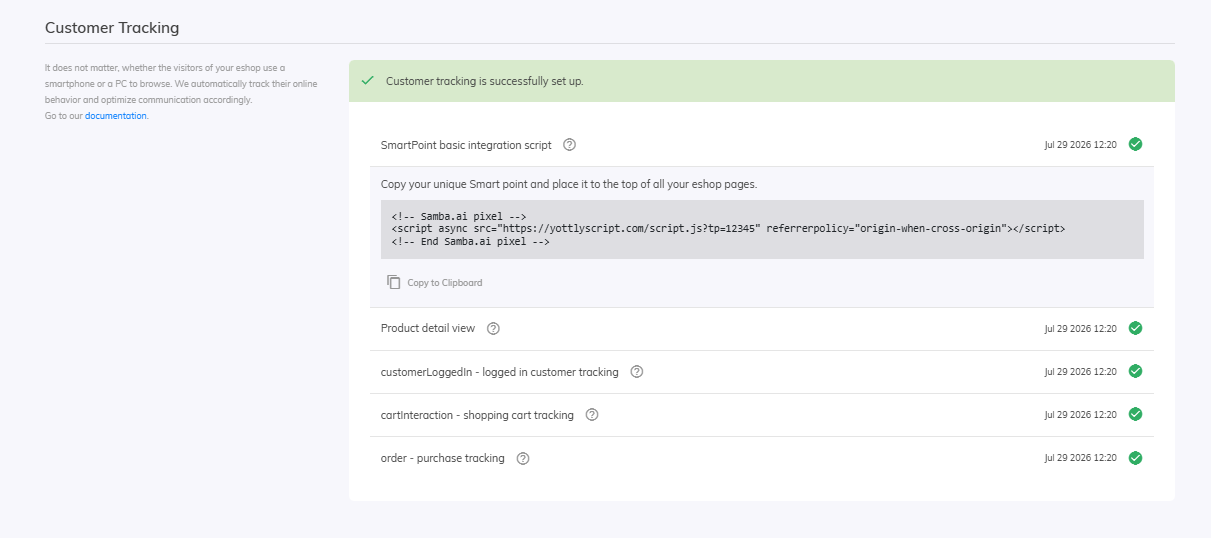
Unlike Data Feeds, Tracking needs to be implemented directly into your e-shop. You will need to add the basic tracking script called SmartPoint and implement three specific methods (customerLoggedIn, cartInteraction, and order) that need to be triggered on your e-shop.
You can find detailed information about implementing SmartPoint and the mentioned methods here.
Once Tracking is correctly implemented, you will see the Customer Tracking section marked as “green” in your Samba account, as shown below:
3. Emailing integration – setting up DNS records
To send email campaigns through Samba, you need to set Samba as your email service provider. This is done by configuring DNS records. After creating your Samba account, the required DNS records are automatically generated in your account settings (under the Integrations tab).
Where should you add these generated DNS records? They need to be added to your web hosting provider, where your e-shop is hosted. We therefore recommend consulting your hosting provider’s technical support or your e-shop administrators – they will most likely know exactly what to do.
You can also find detailed information about DNS records here.
4. Google Analytics
You are almost ready to launch your first campaign! The final step is connecting Google Analytics. It provides information about revenue, sales, and customer behavior. It is also used to provide final statistics and performance reports for your email campaigns.
If you are not familiar with Google Analytics, there is no need to worry – creating an account is simple and free.
After creating your Google Analytics account, you can connect it with Samba. Detailed instructions for this process can be found here.
Once completed, simply inform our sales team that the integration is finished, and you can move on to the final step before creating campaigns – the Warm-up campaign.
5. Domain warm-up
The integration is complete, and only one final step remains before you can fully use Samba: Warm-up.
To help our sending infrastructure “learn” that emails from your account will be sent to a large customer database, it is necessary to perform a Warm-up campaign. This campaign gradually increases the number of recipients across several emails and helps prevent potential deliverability issues that could occur if you immediately sent your first email campaign to your entire database.
You can find more information about Warm-up campaigns here.
The Warm-up is complete and your final warm-up email campaign has finished? Congratulations, the most challenging part is done! 🙂
Now, simply inform our sales team that the integration has been completed, and your marketing activities can begin! You can start creating your own campaigns right away, or explore our guide and jump directly to the topics that interest you the most.
Additional optional integrations
In addition to the basic and required integration steps, Samba.ai also offers many additional extensions. These are not mandatory, but we highly recommend using them.
-
We recommend activating CTR Booster for more accurate analysis of email click-through rates.
-
You can activate additional channels such as Push Notifications, SMS Marketing, or Web Personalization.
-
You can also connect Samba with Meta Ads, Google Analytics, or any third-party service using Webhooks.
-
Information about our API options can be found in our documentation here.
A complete overview of all Samba.ai features and capabilities can be found in a separate article here.
If you need any assistance, please do not hesitate to contact us. For any questions, you can reach our support team directly via the in-app chat in the application or by email at support@samba.ai.
Thank you, and we look forward to working with you!
This post is also available in: