
This post is also available in:


Content of the Repeated Orders Trigger email is comprised of item(s) which suppose to be consumed and predicted to be needed again by customer (Hero product). And personalized additional product content (Complements and Substitutes).
Hero product
The following table lists the source attributes from the product feed.
| Merge tag | Description |
Source (feed) |
| {{hero_product*_title}} | product name | TITLE |
| {{hero_product*_url}} | product URL | URL |
| {{hero_product*_image}} | URL link to the product image | IMAGE |
| {{hero_product*_price}} | product price | PRICE |
| {{hero_product*_price_before}} | price before discount | PRICE_BEFORE_DISCOUNT |
| {{hero_product*_brand}} | product brand | BRAND |
| {{hero_product*_description}} | product description | DESCRIPTION |
| {{hero_product*_product_line}} | product line | PRODUCT_LINE |
| {{hero_product*_sale}} | percentage discount | calculated from PRICE_BEFORE_DISCOUNT and PRICE |
Personalised Substitutes
The following table lists the source attributes from the product feed.
| Merge tag | Description |
Source (feed) |
| {{substitute_product*_title}} | product name | TITLE |
| {{substitute_product*_url}} | product URL | URL |
| {{substitute_product*_image}} | URL link to the product image | IMAGE |
| {{substitute_product*_price}} | product price | PRICE |
| {{substitute_product*_price_before}} | price before discount | PRICE_BEFORE_DISCOUNT |
| {{substitute_product*_brand}} | product brand | BRAND |
| {{substitute_product*_description}} | product description | DESCRIPTION |
| {{substitute_product*_product_line}} | product line | PRODUCT_LINE |
| {{substitute_product*_sale}} | percentage discount | calculated from PRICE_BEFORE_DISCOUNT and PRICE |
Personalised Complements
The following table lists the source attributes from the product feed.
| Merge tag | Description |
Source (feed) |
| {{complement_product*_title}} | product name | TITLE |
| {{complement_product*_url}} | product URL | URL |
| {{complement_product*_image}} | URL link to the product image | IMAGE |
| {{complement_product*_price}} | product price | PRICE |
| {{complement_product*_price_before}} | price before discount | PRICE_BEFORE_DISCOUNT |
| {{complement_product*_brand}} | product brand | BRAND |
| {{complement_product*_description}} | product description | DESCRIPTION |
| {{complement_product*_product_line}} | product line | PRODUCT_LINE |
| {{complement_product*_sale}} | percentage discount | calculated from PRICE_BEFORE_DISCOUNT and PRICE |
Visibility
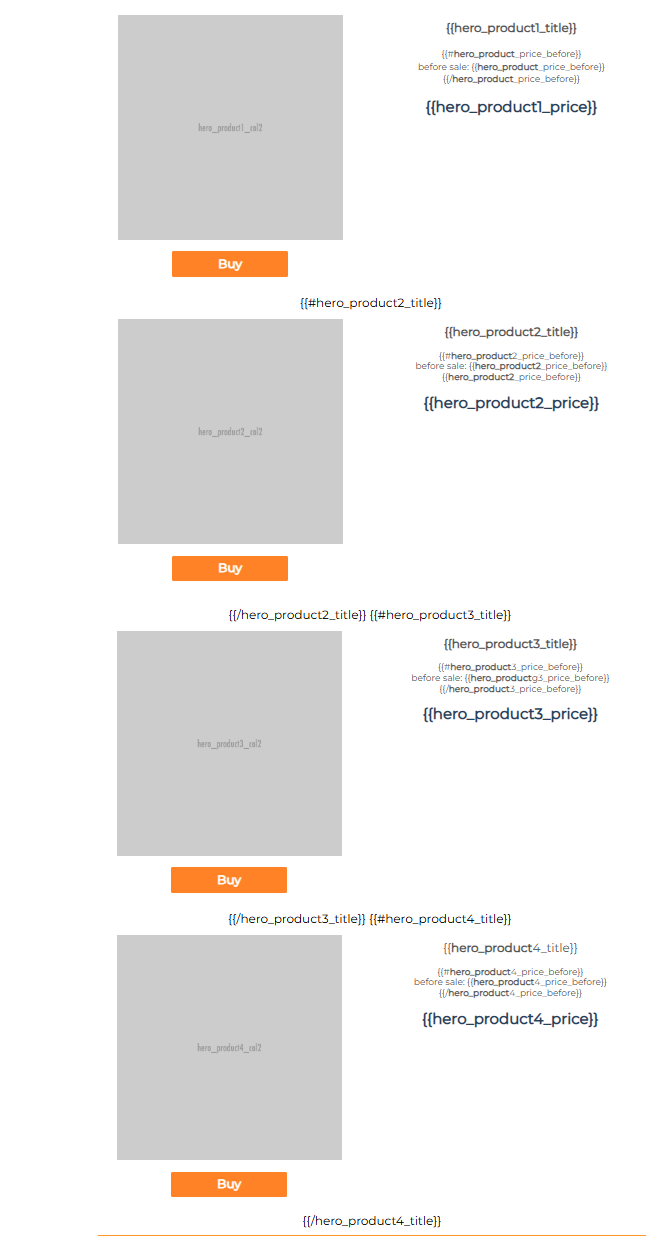
In order to add more placeholders/products to the template, you will also have to divide them using special “visibility” tags. Example below ensure that at least Product1 will be included in the sent email, however Product 2-4 only if these products were identified as a valid option for the selected trigger campaign (for the specific customer).
Product1
{{#hero_product2_title}}
Product 2
{{/hero_product2_title}} {{#hero_product3_title}}
Product 3
{{/hero_product3_title}} {{#hero_product4_title}}
Product 4
{{/hero_product4_title}}
Below is an example taken directly from the Drag & Drop editor. Pay attention to the visibility tags mentioned, which are located between the individual rows (after the first product), as previously mentioned:
Deprecated merge tags
There are also deprecated merge tags that were previously supported but are no longer supported. They were either replaced or removed completely.
| Merge tag | Replaced by |
| {{fmcg*_title}} | {{hero_product*_title}} |
| {{fmcg*_url}} | {{hero_product*_url}} |
| {{fmcg*_image}} | {{hero_product*_url}} |
| {{fmcg*_price}} | {{hero_product*_price}} |
| {{fmcg*_price_before}} | {{hero_product*_price_before}} |
| {{fmcg*_brand}} | {{hero_product*_brand}} |
| {{fmcg*_description}} | {{hero_product*_description}} |
| {{fmcg*_product_line}} | {{hero_product*_product_line}} |
| {{fmcg*_sale}} | {{hero_product*_sale}} |
| {{complement*_product_pack}} | – |
| {{complement*_product_free_shipping}} | – |
| {{complement*_product_alt}} | – |
| {{complement*_product_bubble_text}} | {{complement_product*_sale}} |
| {{complement*_product_title}} | {{complement_product*_title}} |
| {{complement*_product_price}} | {{complement_product*_price}} |
| {{complement*_product_price_before}} | {{complement_product*_price_before}} |
| {{complement*_product_url}} | {{complement_product*_url}} |
| {{complement*_product_image}} | {{complement_product*_image}} |
| {{complement*_product_description}} | {{complement_product*_description}} |
| {{complement*_product_brand}} | {{complement_product*_brand}} |
| {{complement*_product_product_line}} | {{complement_product*_product_line}} |
This post is also available in: