
This post is also available in:


API triggers are designed for e-mail real time sending triggered by calling Samba API from the client side. They can be utilized, for example, to send special offer to customer immediately after his or her registration or any other action.
API Trigger in Samba
- E-mail is sent immediately after your API call, regardless of whether the e-mail address is currently in your database.
- You can use static or personalised template with up to 10 personalised products (if there is any customer with the called e-mail address in your customer database, personalised products are affected by his or her purchase history)
- API call accepts any customer parameter key+value, which you would like to display in the e-mail template.
Create campaign
- In the menu, select API Trigger and click on + New Campaign.

- Campaign settings
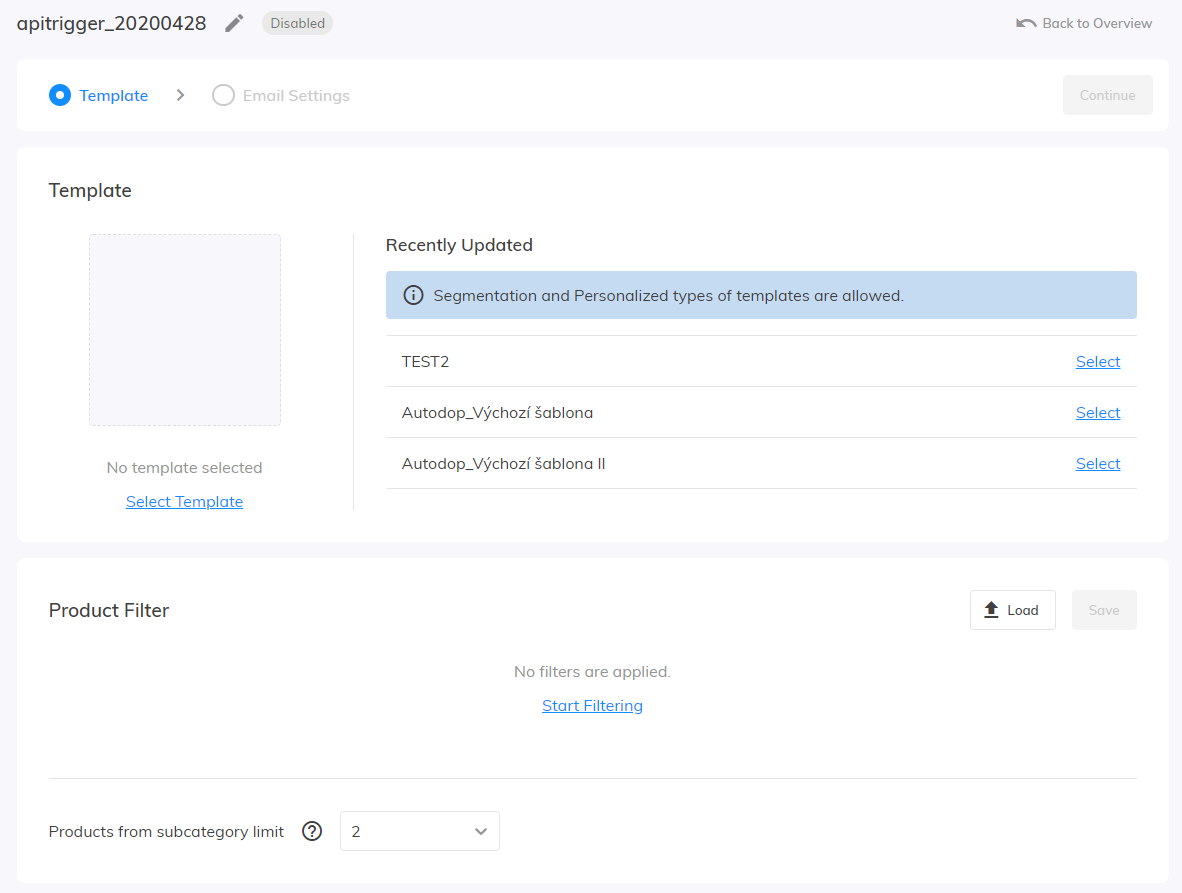

1. Step – Template:
Campaign name: Must be identical to the
campaignNamevalue in the API request itself (in this example:API_Trigger_Test).Product filter: Filter products using the standard segmentation options.
Template: Only Personalization templates are supported.
- The template can display any parameter you define.
-
Insert parameters using the following format:
{{customer_custom_param_*yourParameter*}}*yourParameter*can contain any alphanumeric characters (A–Z, a–z, 0–9) and is case-sensitive.
- If your API request does not include a parameter used in the template (or if its value is an empty string), nothing will be displayed.
- You can use Mustache.js syntax (https://mustache.github.io/mustache.5.html) to create IF/ELSE blocks. For example:
{{#customer_custom_param_product2Title}}This part of the template will **be displayed** if the API request **contains** the "product2Title" parameter and its value is not an empty string.{{/customer_custom_param_product2Title}}{{^customer_custom_param_product2Title}}This part of the template will **be displayed** if the API request **does not contain** the "product2Title" parameter, or if its value is an empty string.{{/customer_custom_param_product2Title}}
2. Step – Email Settings:
Email Information: Subject, preheader
Transactional email: Lets you specify whether the email is marketing or transactional. Read more about what transactional emails are used for and the rules and requirements they must meet.
Sender Details: Samba allows you to register multiple sending domains. You can freely switch between authenticated sending domains for individual campaigns. Simply change the sender details from the default settings to custom ones.
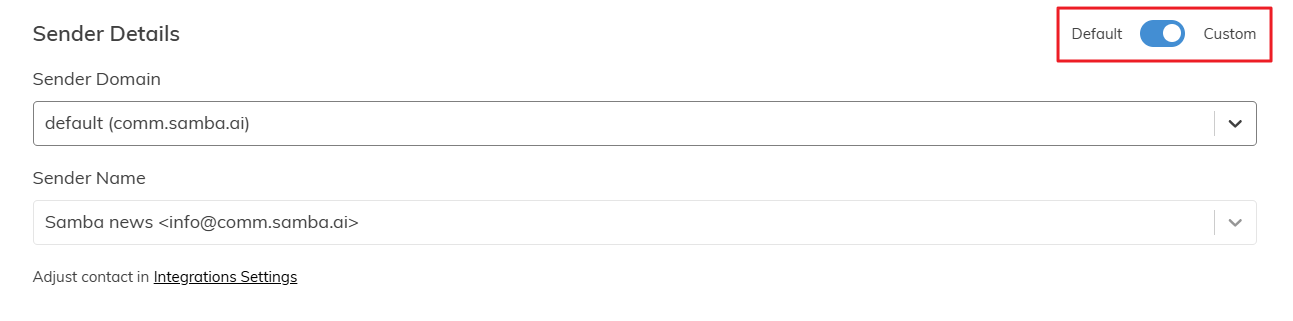 You can also request dedicated sending IP addresses for your sending domains to protect the reputation of your marketing emails and maximize the deliverability of both transactional and marketing messages.
Performance tracking: UTM parameters
- Once you have finished, click Save and Close. The email will be sent immediately after the API trigger is called, provided that the campaign name matches an active campaign in Samba.
How does API Trigger call work?
POSThttps://api.samba.ai/shop/XX/send-trigger-mailheader: X-Api-Key: your-api-key{ "email": "foo@bar.com",
"campaignName": "Triggered Campaign",
"customCustomerParameters": {
"parameter1name": "parameter1value",
"parameter2name": "parameter2value"
}
}xx– Samba ID of your eshopyour-api-key– Samba API key for your eshop (Please ask us for the API key via email)email– the e-mail address on which you want to send the e-mailcampaignName– the name of the campaign corresponding to the campaign name in SambacustomCustomerParameters– optional, key-value pairsparameter1name– the name of the parameter whose value you would like to display in an e-mail template- can contain only alphanumeric characters (A-Z+a-z+0-9,case-sensitive)
parameter1value– the value of the parameter which you would like to display in an e-mail template- If you do not know the value for an API call, do not use this parameter or use an empty string as the value
Example
curl -H 'X-Api-Key:your-api-key' -d '{"email": "foo@bar.com","campaignName": "Triggered Campaign"}' https://api.samba.ai/shop/XX/send-trigger-mail
Response
- success
- HTTP 200 { “status”: “ok”}
- invalid input
- HTTP 200 { “status”: “error”, “error”: “invalidInput” }
- HTTP 200 { “status”: “error”, “error”: “noSuchCampaign” }
- HTTP 200 { “status”: “error”, “error”: “campaignDisabled” }
- error
- HTTP 4xx
- HTTP 5xx
How to add an attachment?
It is possible to send attachments via the API trigger. When configuring the API request, please follow the documentation for the new version of our API.
The old version of the API will soon be deprecated.
This post is also available in: